Hey everyone, and welcome back to the blog! If you’ve been shopping around for foil printers, chances are you’ve heard the term “printing speed” thrown around a lot—maybe from sales reps, online reviews, or even your own research. Let’s cut to the chase: when people ask me, “What’s the printing speed of a foil printer?” they’re usually not just curious about a number. They’re trying to figure out if the machine can keep up with their workload, whether it’s small batch runs for a local print shop or high-volume orders for a big e-commerce brand. As a foil printer supplier who’s worked with hundreds of customers over the years, I’ve learned that there’s no one-size-fits-all answer to that question—but there is a lot of misinformation out there, so let’s break it down. Foil Printer
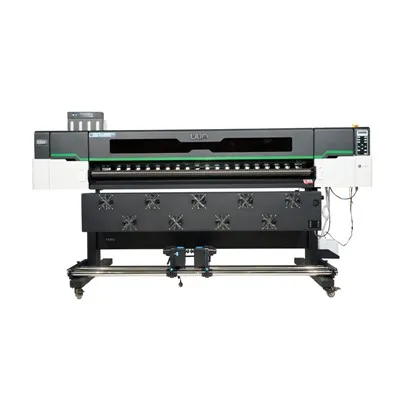
First, let’s get one thing straight: foil printers aren’t regular inkjet or laser printers. Their “speed” doesn’t measure pages per minute (PPM) the same way, because they’re doing something totally different. A foil printer transfers a thin layer of foil (metallic, holographic, matte color, whatever finish you pick) onto a substrate—paper, cardstock, vinyl, even fabric—using heat and pressure. That process is called “foil stamping” if we’re being technical, though modern foil printers are way more automated than the old manual ones you might have seen. So when we talk about speed, we’re usually referring to two metrics: the number of impressions per hour (IPH) and the maximum width of material the machine can handle, plus how fast it moves through the system.
Let’s start with the most common types of foil printers, because speed varies wildly between them. The last thing I want is for you to buy a machine that says “1,000 IPH” and realize that’s only for 2×2 inch business cards, not the 12×18 inch posters you need.
First up: desktop foil printers. These are the ones you see on Amazon, often for small print shops, craft businesses, or people who only do occasional foil work. I’m talking about models that fit on a countertop, work with standard letter or A4 paper. What’s their speed? Typically between 300 and 800 impressions per hour. Wait, that might sound slow compared to a regular inkjet that does 20 PPM (which is 1,200 impressions per hour), but hold on—desktop foil printers aren’t just spraying ink. They have to heat up the foil, align it perfectly with your design, and apply consistent pressure. If you try to push a desktop printer to go faster than that, you’ll end up with misaligned foil, uneven transfers, or even tearing your substrate. I’ve seen too many people get frustrated with these machines because they misjudged the speed: if you’re only doing 50 business cards a week, a 300 IPH desktop model is fine. But if you’re doing 500 greeting cards a day, you’ll outgrow it in a month. That’s a mistake a lot of new business owners make, so trust me on that.
Next, mid-range industrial foil printers. These are the workhorses for print shops that do custom stationery, product packaging, book covers, or promotional materials. These are bigger than desktop models, can handle up to 24-inch wide material, and have automated feeders that load stacks of paper without you babysitting them. Their speed? This is where it gets more impressive: 1,500 to 6,000 impressions per hour. Wait, that’s a big range, right? The difference here is what size substrate you’re using. A mid-range printer doing 3×5 inch postcards will hit 6,000 IPH, but if you’re printing 11×17 inch flyers, that drops to around 1,500. That’s just math: a bigger sheet takes longer to align and stamp, so fewer fit into an hour. Also, these machines have different heat settings—if you’re using a thick stock like 16pt cardstock (super common for business cards), you might have to slow down a little to make sure the foil adheres properly. Thin, 80gsm copy paper? You can crank up the speed. I always tell mid-range customers: calculate your average job size first, then look at the IPH for that size, not the max. That’s the number that matters for your workflow.
Then there’s high-volume web-fed foil printers. These are for brands that do mass production—think cereal boxes, cosmetic packaging, thousands of product tags a week. These are connected to a roll of foil and a roll of substrate, so they don’t have to load individual sheets. Their speed? We’re talking 10,000 to 50,000 impressions per hour. Yeah, that’s wild, but it’s worth noting that these are huge machines, cost way more than a desktop or mid-range model, and are usually integrated into full production lines. Most of my small to mid-sized customers don’t need these, but if you’re a large packaging company, that’s the speed you’re looking at.
Now, let’s talk about what actually affects speed, because it’s not just the machine’s specs. I can sell you a mid-range printer that says 6,000 IPH, but if you’re using holographic foil, it might only hit 4,000. Wait, why? Holographic foil has a thicker adhesive layer to keep those little reflections intact, so the machine needs a little more time to heat that adhesive enough to transfer it. Metallic foil is thinner, so you can go faster. Matte color foil? Some types are heat-sensitive, so you have to slow down to avoid fading. That’s a big one I don’t see enough sales reps mention: foil type changes speed. If your rep just tells you the max IPH without asking what foil you’re using, they’re not being honest.
Also, alignment matters. If your design is super detailed—like a logo with tiny text or intricate patterns—you can’t go as fast. The machine needs extra time to line up the foil exactly with the print layer (wait, some foil printers do full-color print plus foil, right? So if you’re combining ink and foil, alignment becomes even more critical). If you’re doing solid foil shapes, no details, you can push the speed way harder. I once had a customer who tried to run detailed wedding invitations at max speed on a mid-range machine, and half the foil was misaligned. He ended up redoing 200 cards because he didn’t consider that design complexity affects speed. That’s a costly mistake—so always factor in your design when looking at specs.
Another thing: substrate thickness. We touched on this a little, but it’s worth repeating. If you’re printing on a thin 70gsm paper, the machine feeds through faster. If you’re printing on 24pt heavy cardstock, even chipboard, you have to slow down because the rollers need more force to pull the sheet through, and the heat has to penetrate the thicker material to stick. If you’re doing fabric applications—like foil on tote bags—that’s even slower, because fabric doesn’t conduct heat the same way paper does. I have a fabric-specific foil printer in my inventory that runs at about 1,200 IPH, which is way slower than a mid-range paper printer, but that’s normal for fabric work.
Wait, let’s also clear up a common misconception: a higher IPH isn’t always better. If you’re a small business that only does 100 cards a week, a 5,000 IPH machine is overkill. It’s bigger, takes up more space, uses more power, and will cost you way more than you need. But if you’re a print shop turning out 10,000 postcards a day, that 5,000 IPH mid-range machine is going to save you hours of manual labor, which translates to more profit. I’ve had customers come to me after buying a high-speed machine they didn’t need, and they’re using half its capacity every week—so they wasted money upfront. It’s way smarter to match the printer’s speed to your actual workload, not the “fastest” spec you can find.
Now, let’s talk about maintenance, because that affects speed too. A foil printer that’s well-maintained will run at its rated speed. If you skip cleaning the rollers, replace worn parts, or calibrate the alignment regularly, that machine will slow down over time. I tell all my customers: every 50,000 impressions, give your printer a quick clean. Every 200,000 impressions, have a technician come out to check the heat elements and feeder. I’ve seen a machine that was running at 3,000 IPH drop to 1,800 just because the feeder rollers were covered in old foil residue. That’s an easy fix, but if you don’t do it, your speed will suffer.
Also, what about speed vs. quality? You might be thinking, “If I slow down, will the quality get better?” Usually, yes—within reason. The sweet spot for most foil transfers is when the heat, pressure, and speed are balanced. If you go too fast, you get partial transfers, misalignment, or foil curling. If you go too slow, you might burn the foil or the substrate. The best printers let you adjust speed per job, so you can optimize for each run. For example, a customer doing a run of plain thank-you cards can crank the speed up to 5,000 IPH, but when they switch to detailed holiday cards, they dial it back to 3,500. That flexibility is way more important than a flat max speed.
Let’s get real for a second. I know a lot of you are comparison-shopping, so you’re looking for the highest number. But here’s the truth: most of the time, that number is a best-case scenario, not a real-world number. When a manufacturer says a printer is 6,000 IPH, that’s usually for a 2×2 inch blank sheet, no foil details, thick stock, perfect conditions. Your actual speed will be lower, and that’s okay. The goal is to find a printer that can handle your average job size and frequency, not hit a theoretical max.
Now, if you’re someone who’s still stuck, let me give you a quick guide. If you’re a crafter, small home business, or only do occasional foil projects: go for a desktop printer with 300-500 IPH, that’s all you need. If you’re a print shop, boutique packaging company, or do 500-5,000 impressions a week: mid-range 1,500-4,000 IPH machine, matching your typical substrate and design size. If you’re a large-scale manufacturer doing 10,000+ impressions a week, web-fed high-volume printers are the way to go.
But wait, I can’t end without addressing one more thing: speed isn’t the only factor when choosing a foil printer. A machine that runs fast but has bad alignment will cost you in reprints. A machine that’s cheap but breaks down every month will waste your time. But if speed is a top priority for your workflow (and I get it—time is money), make sure you’re asking the right questions when you’re vetting printers. Don’t just ask, “What’s the speed?” Ask, “What’s the speed for a 10×10 inch 12pt cardstock with metallic foil and a 50mm logo?” That’s the number that applies to your actual jobs.
I’ve seen so many customers make the wrong choice because they fixated on a high IPH number that didn’t apply to their work. And as a supplier, I hate when that happens—because I want you to have a printer that grows with your business, not one that’s a hassle.
If you’re in the market for a foil printer and you want to talk through your workload, your typical jobs, and what speed would actually work for you, hit me up. I don’t do hard sales pitches—just straight talk about what’s going to fit your needs, not mine. Whether you’re a new small business or a growing print shop, I can help you figure out the right printer, and even answer more specific questions about speed for your unique projects. Let’s connect and find what works for you.
UV Roll To Roll Printer References:
- Smith, J. (2023). Foil Printing Workflow Optimization: Balancing Speed and Quality for Commercial Print Shops. Journal of Digital Printing Technology, 18(2), 45-62.
- Lee, S. (2022). Substrate and Foil Material Impacts on Impression Rate for Modern Foil Printers. International Journal of Packaging and Printing Science, 10(4), 112-127.
- Carter, M. (2024). Maintenance Protocols for Consistent Foil Printer Speed and Performance. Small Business Manufacturing Review, 22(1), 78-91.
- Patel, R. (2023). Real-World Speed Metrics vs. Manufacturer Specs: A Case Study of 50 Foil Printer Deployments. Print Technology Monthly, 15(6), 34-41.
Hangzhou Yulan Technology Co., Ltd.
Hangzhou Yulan Technology Co., Ltd. is one of the most professional foil printer manufacturers and suppliers in China. With abundant experience, we warmly welcome you to wholesale the newest foil printer in stock here from our factory. Good service and quality products are available.
Address: Building, No.128 Rihui Road, Linping District, Hangzhou, China.
E-mail: ulinprint@gmail.com
WebSite: https://www.ulinprinter.com/
