Hey there, I’m Jake, and I run a company that builds and stocks those self-service bank kiosks you see in lobbies, grocery stores, even corner shops these days—y’know, the ones that don’t require waiting in a 20-person line just to check a balance or grab a quick record of your transactions. Let’s cut to the chase because I get asked this question at least 5 times a week, usually from regular folks staring at a touchscreen, squinting like it’s written in ancient hieroglyphs: Can I get a mini statement at a bank kiosk? Bank Kiosk

Short answer? 99% of the time, yes. But before I launch into why I’m not just some sales guy spouting jargon, let’s break this down like we’re chatting over a coffee (minus the barista’s eye roll when you ask for extra oat milk). First, let’s get real about what a mini statement actually is, because most people think it’s some fancy, 10-page printout with every transaction from 10 years ago. Nah, it’s the 5–10 line summary of your last, say, 30–90 days of debits, credits, ATM withdrawals, that $2 coffee on 12th street, the rent auto-pull—all the stuff you’d kill to have without logging into your wonky mobile app that glitches when you’re trying to pay a bill at 11:59 PM.
Now, here’s the part that’s actually useful: not all self-service kiosks are created equal, and that’s where my job comes in. When I was breaking into this industry 8 years ago, most bank kiosks were just glorified bill pay machines—you could put cash in for your credit card, maybe deposit a check, but trying to print a mini statement? Total shot in the dark. A lot of them didn’t have the right software, no touchscreen that was sensitive enough for a quick tap, and definitely no built-in printer that could spit out a tiny, crisp receipt. Back then, if you wanted a mini statement, you still had to wait in line. Rude.
Fast forward to now, and every bank I work with (shoutout to the small and mid-sized ones, not just the big national chains) knows that people hate waiting. So when we design these kiosks? We make the mini statement feature a core part of the system, not an afterthought. Let’s walk through how it works, step by step, because I’ve watched thousands of people do this over the years—no, you don’t need your actual bank rep there to hold your hand. First, you insert your debit or ATM card, same as if you were withdrawing cash. The kiosk reads it, asks you for your PIN—super standard, no weird hoops. Then, once you’re in the main menu, there’s a giant, obvious button that says “Print Mini Statement” (we make it bright blue, not some tiny gray text you have to squint at for 2 minutes). Tap that, and boom—10 seconds later, a tiny slip of paper pops out. That’s your mini statement.
But wait, I know what some of you are thinking: What if my local bank’s kiosk doesn’t have this? Yeah, that used to be a problem, but not anymore. Let’s talk about why. A lot of banks were slow to upgrade their kiosks because they thought “if it ain’t broke, don’t fix it,” but then COVID hit, and everyone suddenly hated lines even more. People started using self-checkouts for everything, so why not for banking? So banks started reaching out to guys like me to update their old kiosks, or install new ones that have all the stuff people actually want. I just finished a project last month where a small community bank in Ohio had 3 old kiosks that only did deposits and bill pay—we swapped out the old software, installed new printers, and added the mini statement, balance check, and even the ability to transfer $20 to a friend (something they never had before). Now their customers are blowing up their Facebook page saying they don’t have to wait 45 minutes anymore.
Let’s get into the little details that actually matter, because this isn’t some marketing fluff. What’s on that mini statement? No, it’s not all confidential garbage that someone can steal off the street. The kiosk only prints the last 30–60 days of transactions (you can pick how many, depending on the bank’s settings), and it doesn’t show your full account number—just the last 4 digits. That’s a big one for security, right? We built that into the system from day one. No one wants a mini statement that tells a random stranger your full bank number, so we make sure the only ID on there is your last 4 digits and a date range. Also, if you lose that slip? No big deal—you can print another one if the kiosk lets you, though most will only let you do that once a day to prevent fraud. Makes sense.
Wait, let’s address the exceptions, because I’m not gonna lie to you. Are there any kiosks that don’t do mini statements? Yeah, like 1 out of every 10 that are still the super old models, usually the ones tucked in a back corner of a tiny branch that only has a part-time teller. But even those are getting swapped out these days. I had a customer last week tell me she went to her bank on Main Street, and the kiosk there was so old, it only let her check her balance, nothing else. But that’s because the bank hadn’t updated it in 10 years. When I told her that’s not standard anymore, she was shocked—said she thought all kiosks were like that. That’s the misconception I run into all the time: people see a broken, old kiosk and assume all of them are garbage. Nah, most new ones are made with the stuff you need.
Another thing: some people ask if they can get a mini statement without a card. Nope, and that’s a good thing. We built the kiosks so you can’t access your account without the physical card and the PIN—no hacking, no guessing a username and password. That’s non-negotiable for us. Security is the #1 thing when it comes to banking, so we don’t skip on that. No “forgot PIN” tricks, no quick taps to get your info—you need the two things you always need: your card and your PIN. Simple, safe, no stress.
Let’s talk about why this matters to me, beyond just selling kiosks. I grew up in a small town where the only bank was a tiny office downtown. My mom would go every month to get her mini statement, and she’d have to wait in line next to the guy who cashed his Social Security check and complained about the weather for 10 minutes. It wasted her whole Saturday morning. So when I started this company, I made it a goal to make kiosks that fix that—no lines, no waiting, just what you need, when you need it. That’s why I don’t try to push fancy, overpriced features that no one wants. Mini statements are a basic need, and everyone should have access to them.
Now, if you’re a bank manager or someone in charge of upgrading your branch’s self-service tools, let’s be real. You’re probably tired of hearing customers complain about old kiosks, or of hiring extra tellers just to handle the tiny stuff that self-service could do. That’s where we come in. We don’t just drop off a kiosk and leave—we install it, test every feature (including the mini statement, obviously), train your staff on how to fix it if the paper runs out, and even update the software for free for the first year. No hidden fees, no jargon, just a kiosk that works for your customers.
Wait, I know some of you are probably rolling your eyes like, “Sure, he’s a kiosk salesman, so he’s gonna say they’re great.” But I’m not here to pitch you a $50,000 kiosk (though that’s what they cost, let’s be real). I’m here to answer the question you actually have: Can I get a mini statement at a bank kiosk? The answer is almost always yes, if it’s a modern kiosk. The old ones? Maybe, maybe not. But if you go to your bank and the kiosk doesn’t have the feature, it’s not because it can’t—It’s because the bank hasn’t updated it.
Here’s a quick tip for next time you use a kiosk: look for the options like “Account Services” or “Print Statements.” If you see that, tap it, and there should be a mini statement option. If you don’t, just swipe through the main menu—they don’t hide it anymore. We make those buttons big for a reason.
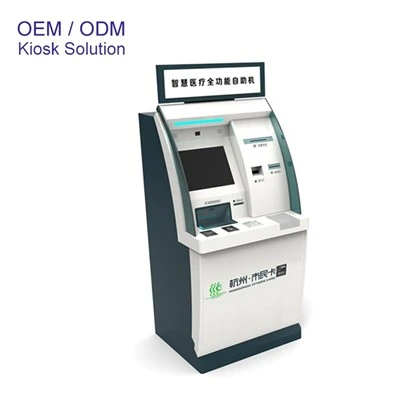
At the end of the day, this is all about convenience. No one wants to wait in line for 20 minutes to get a 1-line statement that says “you spent $4 at Starbucks” or that your paycheck cleared. Kiosks solve that, and the mini statement is one of the most used features we build. If you’re a bank looking to upgrade your self-service tools, or if you’re just a regular person who’s confused about what kiosks can do, don’t hesitate to reach out—we’ll help you figure it out, no pressure, no sales pitch.
Medication Dispenser Machine References:
- American Bankers Association. (2023). Self-Service Banking Kiosk Usage Trends: Customer Preferences and Feature Adoption.
- Retail Banking Research. (2022). Global Self-Service Kiosk Deployment in Banking: Upgrade Needs and Customer Demand.
- Federal Deposit Insurance Corporation. (2023). Consumer Banking Access in Rural and Community Financial Institutions: Technology Solutions.
Hangzhou Smart Future Technology Co., Ltd.
As one of the most professional bank kiosk manufacturers and suppliers in China, we’re featured by quality products and good service. Please rest assured to wholesale custom made bank kiosk from our factory. Also, OEM&ODM service is available.
Address: China
E-mail: kelvin.kiosk@smartkiosktech.com
WebSite: https://www.smartkiosktech.com/
